Adding a Battery Bar
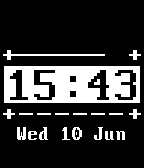
Another popular feature added to a lot of watchfaces is a battery meter, enabling users to see the state of their Pebble's battery charge level at a glance. This is typically implemented as the classic 'battery icon' that fills up according to the current charge level, but some watchfaces favor the more minimal approach, which will be implemented here.
To continue from the last part, you can either modify your existing Pebble
project or create a new one, using the code from the end of the last tutorial
as a starting point. Don't forget also to include changes to package.json.
The state of the battery is obtained using the BatteryStateService. This
service offers two modes of usage - 'peeking' at the current level, or
subscribing to events that take place when the battery state changes. The latter
approach will be adopted here. The battery level percentage will be stored in an
integer at the top of the file:
static int s_battery_level;
As with all the Event Services, to receive an event when new battery information
is available, a callback must be registered. Create this callback using the
signature of BatteryStateHandler, and use the provided
BatteryChargeState parameter to store the current charge percentage. Place
it before init(), such as after tick_handler():
static void battery_callback(BatteryChargeState state) {
  // Record the new battery level
  s_battery_level = state.charge_percent;
}
To enable this function to be called when the battery level changes, subscribe
to updates in init():
// Register for battery level updates
battery_state_service_subscribe(battery_callback);
With the subscription in place, the UI can be created. This will take the form
of a Layer with a LayerUpdateProc that uses the battery level to draw a
thin, minimalist white meter along the top of the time display.
Create the LayerUpdateProc that will be used to draw the battery meter:
static void battery_update_proc(Layer *layer, GContext *ctx) {

}
Declare this new Layer at the top of the file:
static Layer *s_battery_layer;
Allocate the Layer in main_window_load(), assign it the LayerUpdateProc that will draw it, and
add it as a child of the main Window to make it visible:
// Create battery meter Layer
s_battery_layer = layer_create(GRect(14, 54, 115, 2));
layer_set_update_proc(s_battery_layer, battery_update_proc);

// Add to Window
layer_add_child(window_get_root_layer(window), s_battery_layer);
To ensure the battery meter is updated every time the charge level changes, mark
it 'dirty' (to ask the system to re-render it at the next opportunity) within
battery_callback():
// Update meter
layer_mark_dirty(s_battery_layer);
The final piece of the puzzle is the actual drawing of the battery meter, which
takes place within the LayerUpdateProc. The background of the meter is drawn
to 'paint over' the background image, before the width of the meter's 'bar' is
calculated using the current value as a percentage of the bar's total width
(114px).
The finished version of the update procedure is shown below:
static void battery_update_proc(Layer *layer, GContext *ctx) {
  GRect bounds = layer_get_bounds(layer);

  // Find the width of the bar (total width = 114px)
  int width = (s_battery_level * 114) / 100;

  // Draw the background
  graphics_context_set_fill_color(ctx, GColorBlack);
  graphics_fill_rect(ctx, bounds, 0, GCornerNone);

  // Draw the bar
  graphics_context_set_fill_color(ctx, GColorWhite);
  graphics_fill_rect(ctx, GRect(0, 0, width, bounds.size.h), 0, GCornerNone);
}
Lastly, as with the TickTimerService, the BatteryStateHandler can be
called manually in init() to display an inital value:
// Ensure battery level is displayed from the start
battery_callback(battery_state_service_peek());
Don't forget to free the memory used by the new battery meter in
main_window_unload() as with the other Layer objects:
layer_destroy(s_battery_layer);
With this new feature in place, the watchface will now display the watch's battery charge level in a minimalist fashion that integrates well with the existing design style.
Conclusion
Now our watchface shows the watch's remaining battery level! It's discreet, but very useful.
As usual, you can compare your code to the example code provided below.
The JS code file remains unchanged from the last part of the tutorial.
View C code
#include <pebble.h>

static Window *s_main_window;
static TextLayer *s_time_layer;
static BitmapLayer *s_background_layer;
static TextLayer *s_weather_layer;
static Layer *s_battery_layer;

static GFont s_time_font;
static GFont s_weather_font;
static GBitmap *s_background_bitmap;

static int s_battery_level;

static void update_time() {
  // Get a tm structure
  time_t temp = time(NULL);
  struct tm *tick_time = localtime(&temp);

  // Write the current hours and minutes into a buffer
  static char s_buffer[8];
  strftime(s_buffer, sizeof(s_buffer), clock_is_24h_style() ?
                                          "%H:%M" : "%I:%M", tick_time);

  // Display this time on the TextLayer
  text_layer_set_text(s_time_layer, s_buffer);
}

static void battery_update_proc(Layer *layer, GContext *ctx) {
  GRect bounds = layer_get_bounds(layer);

  // Find the width of the bar (total width = 114px)
  int width = (s_battery_level * 114) / 100;

  // Draw the background
  graphics_context_set_fill_color(ctx, GColorBlack);
  graphics_fill_rect(ctx, bounds, 0, GCornerNone);

  // Draw the bar
  graphics_context_set_fill_color(ctx, GColorWhite);
  graphics_fill_rect(ctx, GRect(0, 0, width, bounds.size.h), 0, GCornerNone);
}

static void main_window_load(Window *window) {
  // Get information about the Window
  Layer *window_layer = window_get_root_layer(window);
  GRect bounds = layer_get_bounds(window_layer);

  // Create GBitmap
  s_background_bitmap = gbitmap_create_with_resource(RESOURCE_ID_IMAGE_BACKGROUND);

  // Create BitmapLayer to display the GBitmap
  s_background_layer = bitmap_layer_create(bounds);
  bitmap_layer_set_bitmap(s_background_layer, s_background_bitmap);
  layer_add_child(window_layer, bitmap_layer_get_layer(s_background_layer));

  // Create GFont
  s_time_font = fonts_load_custom_font(resource_get_handle(RESOURCE_ID_FONT_PERFECT_DOS_48));

  // Create the TextLayer with specific bounds
  s_time_layer = text_layer_create(
      GRect(0, PBL_IF_ROUND_ELSE(58, 52), bounds.size.w, 50));
  text_layer_set_background_color(s_time_layer, GColorClear);
  text_layer_set_text_color(s_time_layer, GColorBlack);
  text_layer_set_text(s_time_layer, "00:00");
  text_layer_set_font(s_time_layer, fonts_get_system_font(FONT_KEY_BITHAM_42_BOLD));
  text_layer_set_text_alignment(s_time_layer, GTextAlignmentCenter);
  text_layer_set_font(s_time_layer, s_time_font);
  layer_add_child(window_layer, text_layer_get_layer(s_time_layer));

  // Create weather Layer
  s_weather_layer = text_layer_create(
      GRect(0, PBL_IF_ROUND_ELSE(125, 120), bounds.size.w, 25));
  text_layer_set_background_color(s_weather_layer, GColorClear);
  text_layer_set_text_color(s_weather_layer, GColorWhite);
  text_layer_set_text_alignment(s_weather_layer, GTextAlignmentCenter);
  text_layer_set_text(s_weather_layer, "Loading...");

  // Create second custom font, apply it and add to Window
  s_weather_font = fonts_load_custom_font(resource_get_handle(RESOURCE_ID_FONT_PERFECT_DOS_20));
  text_layer_set_font(s_weather_layer, s_weather_font);
  layer_add_child(window_get_root_layer(window), text_layer_get_layer(s_weather_layer));

  // Create battery meter Layer
  s_battery_layer = layer_create(GRect(14, 53, 115, 2));
  layer_set_update_proc(s_battery_layer, battery_update_proc);

  // Add to Window
  layer_add_child(window_get_root_layer(window), s_battery_layer);
}

static void main_window_unload(Window *window) {
  // Destroy TextLayer
  text_layer_destroy(s_time_layer);

  // Unload GFont
  fonts_unload_custom_font(s_time_font);

  // Destroy BitmapLayer
  bitmap_layer_destroy(s_background_layer);

  // Destroy GBitmap
  gbitmap_destroy(s_background_bitmap);

  // Destroy weather elements
  text_layer_destroy(s_weather_layer);
  fonts_unload_custom_font(s_weather_font);

  layer_destroy(s_battery_layer);
}

static void tick_handler(struct tm *tick_time, TimeUnits units_changed) {
  update_time();

  // Get weather update every 30 minutes
  if (tick_time->tm_min % 30 == 0) {
    // Begin dictionary
    DictionaryIterator *iter;
    app_message_outbox_begin(&iter);

    // Add a key-value pair
    dict_write_uint8(iter, 0, 0);

    // Send the message!
    app_message_outbox_send();
  }
}

static void battery_callback(BatteryChargeState state) {
  // Record the new battery level
  s_battery_level = state.charge_percent;

  // Update meter
  layer_mark_dirty(s_battery_layer);
}

static void inbox_received_callback(DictionaryIterator *iterator, void *context) {
  // Store incoming information
  static char temperature_buffer[8];
  static char conditions_buffer[32];
  static char weather_layer_buffer[32];

  // Read tuples for data
  Tuple *temp_tuple = dict_find(iterator, MESSAGE_KEY_TEMPERATURE);
  Tuple *conditions_tuple = dict_find(iterator, MESSAGE_KEY_CONDITIONS);

  // If all data is available, use it
  if (temp_tuple && conditions_tuple) {
    snprintf(temperature_buffer, sizeof(temperature_buffer), "%dC", (int)temp_tuple->value->int32);
    snprintf(conditions_buffer, sizeof(conditions_buffer), "%s", conditions_tuple->value->cstring);
  }

  // Assemble full string and display
  snprintf(weather_layer_buffer, sizeof(weather_layer_buffer), "%s, %s", temperature_buffer, conditions_buffer);
  text_layer_set_text(s_weather_layer, weather_layer_buffer);
}

static void inbox_dropped_callback(AppMessageResult reason, void *context) {
  APP_LOG(APP_LOG_LEVEL_ERROR, "Message dropped!");
}

static void outbox_failed_callback(DictionaryIterator *iterator, AppMessageResult reason, void *context) {
  APP_LOG(APP_LOG_LEVEL_ERROR, "Outbox send failed!");
}

static void outbox_sent_callback(DictionaryIterator *iterator, void *context) {
  APP_LOG(APP_LOG_LEVEL_INFO, "Outbox send success!");
}

static void init() {
  s_main_window = window_create();
  window_set_background_color(s_main_window, GColorBlack);
  window_set_window_handlers(s_main_window, (WindowHandlers) {
    .load = main_window_load,
    .unload = main_window_unload
  });
  window_stack_push(s_main_window, true);

  tick_timer_service_subscribe(MINUTE_UNIT, tick_handler);
  update_time();

  // Register callbacks
  app_message_register_inbox_received(inbox_received_callback);
  app_message_register_inbox_dropped(inbox_dropped_callback);
  app_message_register_outbox_failed(outbox_failed_callback);
  app_message_register_outbox_sent(outbox_sent_callback);

  // Open AppMessage
  const int inbox_size = 256;
  const int outbox_size = 128;
  app_message_open(inbox_size, outbox_size);

  // Register for battery level updates
  battery_state_service_subscribe(battery_callback);

  // Ensure battery level is displayed from the start
  battery_callback(battery_state_service_peek());
}

static void deinit() {
  window_destroy(s_main_window);
}

int main(void) {
  init();
  app_event_loop();
  deinit();
}
What's Next?
In the next and final section of this tutorial, we'll use the Connection Service to notify the user when their Pebble smartwatch disconnects from their phone.